
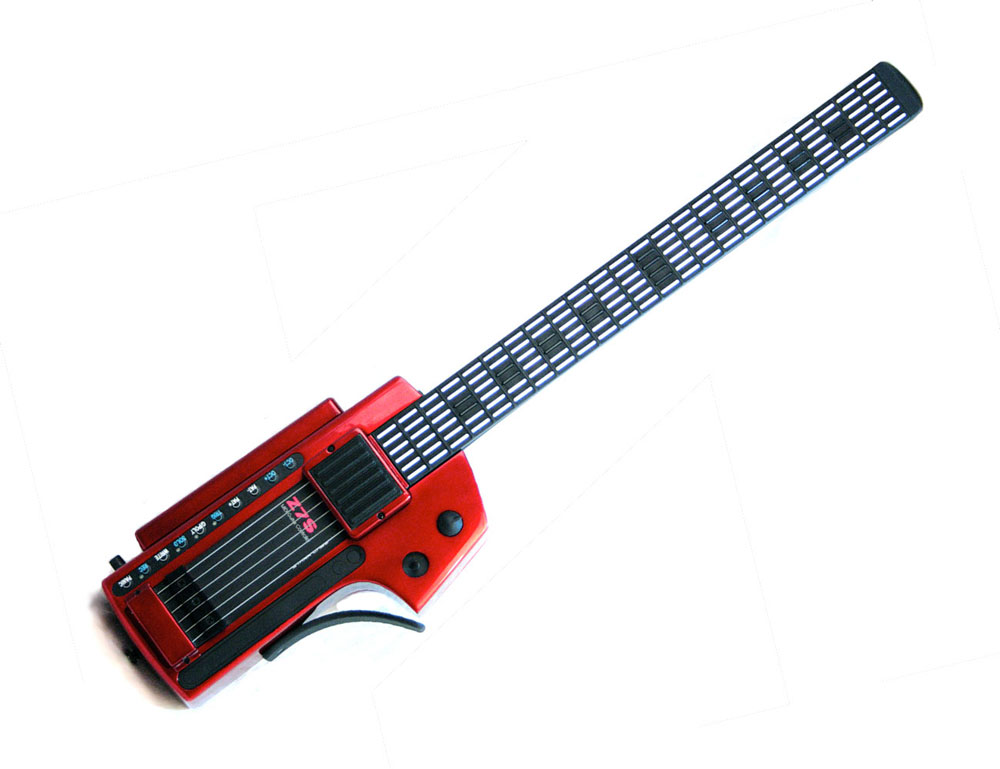
How to Upgrade and Maintain an Older Ztar
How to Upgrade and Maintain an Older Ztar begins with understanding the instrument you already own. A well-maintained Ztar can remain a valuable part of a musician’s studio, live-performance rig, or creative workflow for many years. The right maintenance plan can help preserve reliable MIDI control, improve string-trigger response, protect the instrument’s existing configuration, and identify useful upgrades without replacing components unnecessarily.
An older Ztar should not be treated like a generic guitar or a disposable electronic controller. Starr Labs instruments combine a programmable fingerboard, MIDI electronics, performance sensors, string-trigger systems, and model-specific options. Before adjusting hardware or ordering a replacement component, identify the exact model, document the current configuration, and clarify the problem or improvement you want to address.
This guide explains How to Upgrade and Maintain an Older Ztar carefully and practically. For additional product information, explore the Ztar MIDI guitar overview, review the Ztar MIDI guitar controller guide, or visit the Starr Labs support page.
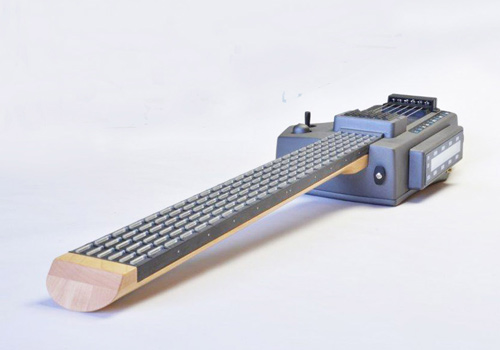
How to Upgrade and Maintain an Older Ztar Before Making Changes
The first step is not opening the instrument. The first step is documenting what you own and how it currently behaves. Older Ztars may differ by model, revision, trigger system, selected options, and previous modifications. Accurate information helps prevent unnecessary part replacements and makes it easier to determine whether a setup adjustment, maintenance step, or hardware upgrade is the best solution.
Identify the Exact Ztar Model
Write down the product name and any model information available for the instrument. Relevant models may include a Z6S, Z7S, MiniZS, or another Ztar configuration. If you are uncertain about the model, take clear photographs of the body, controls, connectors, string-trigger area, and internal component that may require attention.
Musicians reviewing model families and available configurations can visit the Z6 Series page and the Ztar MIDI guitar options page.
Document the Current Performance Setup
Before changing settings, save or record the existing configuration whenever possible. Write down the tunings, MIDI channels, patches, fretboard zones, trigger settings, and any custom mappings used during live performances or recording sessions.
A simple maintenance record can include:
- The exact Ztar model.
- The approximate age of the instrument.
- The installed trigger system.
- The current string tension.
- The MIDI hardware or software connected to the instrument.
- The settings used for rehearsals, performances, or studio sessions.
- Any symptoms, such as missed notes, ghost notes, inconsistent response, or connection problems.
- Photographs taken before any hardware changes.
Separate Setup Issues From Hardware Issues
Not every performance problem requires a replacement component. An older Ztar may need a sensitivity adjustment, a connection check, a configuration update, or a closer review of the playing technique before a hardware change is necessary.
When a problem cannot be isolated confidently, contact Starr Labs before disassembling the instrument. Use the contact page or call 858-285-0831 with the model information, photographs, and a clear description of the issue.
How to Upgrade and Maintain an Older Ztar String-Trigger System
The string-trigger system is one of the most important areas to review when maintaining an older Ztar. A responsive trigger system can help the instrument capture fast playing accurately and translate the musician’s touch into useful MIDI performance data.
Check String Tension and Physical Condition
Inspect the strings and trigger area carefully. The strings should not be excessively slack. A consistent physical setup creates a more reliable foundation for sensitivity adjustments and performance testing.
Look for:
- Loose or uneven string tension.
- Visible wear or damage.
- Loose hardware.
- Dust or debris near the trigger area.
- Changes in response from one string to another.
- Unexpected notes or missing notes during normal playing.
Adjust the Response to Match Your Playing Style
A musician with a light touch may need a different response setup than a player who picks aggressively. The goal is to capture intentional notes while reducing unwanted notes and inconsistent response.
Depending on the older Ztar model and configuration, the relevant setup review may include:
- String tension: Confirm that the strings are set consistently.
- Trimpot gain: Review whether the physical gain settings match the player’s technique.
- Response curves: Adjust how the instrument translates playing dynamics into MIDI data.
- Software gain: Review digital sensitivity settings carefully.
- Hammer-on settings: Confirm that threshold settings support the intended playing technique.
Small changes should be tested one at a time. Avoid changing several settings at once because that makes it difficult to identify which adjustment improved or weakened the response.
Recognize Signs That an Upgrade May Be Appropriate
Some compatible older instruments may benefit from an updated preamp card. Consider asking Starr Labs about an upgrade when:
- The string-trigger system requires repeated adjustment to remain consistent.
- Fast playing produces an uneven response.
- Notes do not trigger as clearly as expected.
- The instrument uses a compatible older steel string-trigger system.
- You want to improve an older instrument rather than replace the entire controller.
Upgrade the String-Trigger Preamp in a Compatible Older Ztar
The Upgrade String Trigger Preamp for older Ztars is an important option for compatible instruments. Starr Labs describes the Rev3 preamp card as a drop-in replacement designed for existing customers with Z6S, Z7S, MiniZS, and other Ztar models that use steel string triggers.
The purpose of this upgrade is to improve the speed and accuracy of the string-trigger system while making setup easier. It can be a practical solution for musicians who want better performance from an existing controller without replacing the complete instrument.
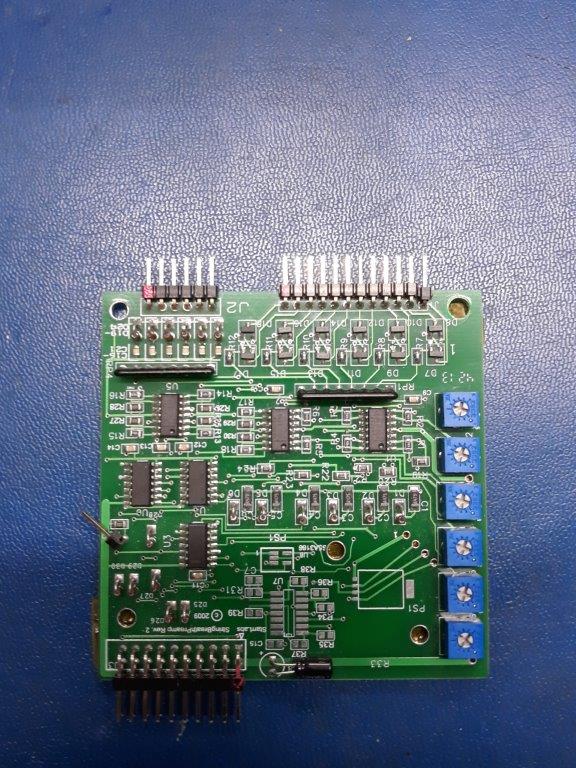
Confirm Compatibility Before Ordering the Rev3 Preamp Card
Do not assume that every older controller uses the same internal hardware. Before ordering, confirm:
- The exact Ztar model.
- Whether the instrument uses steel string triggers.
- Whether the Rev3 preamp card matches the existing configuration.
- Whether any additional installation guidance is required.
- Current availability and shipping details.
If the model or revision is unclear, send Starr Labs photographs of the instrument and the existing component before placing the order.
Install an Upgrade Carefully
A drop-in replacement should still be approached carefully. Power down the instrument, disconnect cables, document the existing component position, and follow the model-specific instructions. Do not force connectors or make assumptions about orientation.
When installation details are unclear, pause and request guidance. A careful installation protects the instrument and makes the upgrade more useful.
How to Maintain an Older Ztar Fretboard and Controls
The fretboard and performance controls are central to the playing experience. Routine care should protect the surfaces without exposing the electronics to unnecessary moisture, pressure, or harsh cleaning products.
Keep the Fretboard Clean
Use a soft, dry cloth to remove dust and residue from the playing surface. Avoid saturating the fretboard with liquid. When a deeper cleaning is needed, confirm the correct method for the specific instrument before applying a cleaning product.
Inspect Buttons, Pads, Knobs, and Sensors
Test the controls periodically rather than waiting until a performance problem appears. Check whether each button, knob, pad, and sensor responds consistently. Document changes that develop over time.
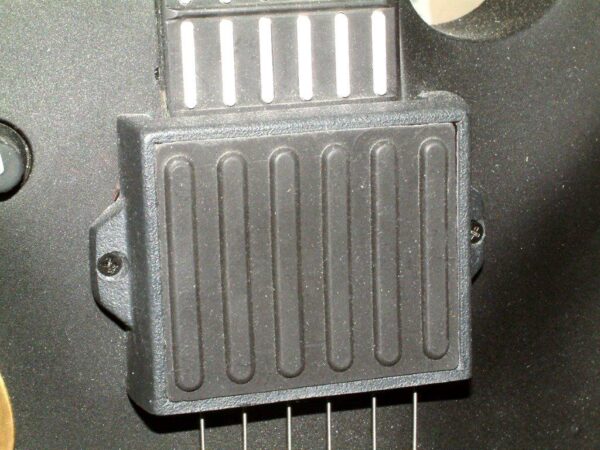
Musicians reviewing expandable Ztar controls can explore the TCA-1 Trigger Cap assembly. The TCA-1 is designed as a six-sensor TriggerPad assembly for compatible setups and can add touch-sensitive performance control.
Protect the Instrument During Transport
An older Ztar should be stored and transported carefully. Avoid leaving the controller exposed to excessive heat, moisture, impacts, or pressure on the controls. After transportation, inspect the instrument and test the primary controls before a rehearsal or live performance.
How to Upgrade an Older Ztar With Additional Performance Controls
Maintenance preserves the instrument. Upgrades expand its creative possibilities. The right upgrade depends on the player’s technique and the role the controller fills within a larger MIDI setup.
Add Touch-Sensitive Trigger Pads
The TCA-1 Trigger Cap assembly may be useful for musicians who want additional expressive controls. Starr Labs describes the assembly as a set of touch-sensitive TriggerPads that can be programmed for notes, chords, velocity-sensitive response, MIDI continuous-controller functions, and other assigned uses.
Review Wireless MIDI Options
Wireless MIDI can simplify some live-performance setups by reducing cable limitations. Musicians interested in Bluetooth MIDI can review the CME WIDI Master BLE-MIDI wireless accessory. Certain instruments can be configured with an internal BLE-MIDI wireless module.
Compare a Targeted Upgrade With a New Configuration
Some musicians need only a replacement card or an added control surface. Others may be better served by comparing a newer configuration. The Options for Ztar Z6S-DLX page provides an overview of performance controls and available configuration ideas.
Before purchasing multiple upgrades, decide whether the existing instrument still matches your long-term needs. Starr Labs can help you compare a focused repair, a practical upgrade, and a new controller configuration.
Older Ztar Maintenance Checklist
| Maintenance Area | What to Review | Recommended Action |
|---|---|---|
| Instrument Identification | Model, revision, trigger system, selected options | Document details and take photographs before changing parts |
| String Triggers | String tension, gain, response, missed notes, ghost notes | Test adjustments individually and ask about the Rev3 preamp upgrade when appropriate |
| Fretboard | Dust, residue, inconsistent response, visible damage | Clean gently with a soft cloth and request guidance for deeper cleaning |
| Controls and Sensors | Buttons, pads, knobs, joysticks, ribbons, and sensor response | Test regularly and document changes over time |
| MIDI Connections | USB, five-pin MIDI, wireless accessories, connected hardware | Inspect cables and test the signal path before troubleshooting software |
| Stored Settings | Tunings, mappings, presets, zones, MIDI channels | Record or back up important configurations before making changes |
| Transport and Storage | Heat, moisture, impact risk, pressure on controls | Store securely and test the instrument after transportation |
How to Troubleshoot an Older Ztar Before Replacing Parts
Before ordering a component, perform a structured review. Troubleshooting one area at a time helps avoid unnecessary purchases and makes it easier to explain the issue when requesting support.
If the Ztar Does Not Power On
- Confirm that the selected power source matches the intended setup.
- Inspect the connected cables and adapters.
- Test the power connection carefully.
- Contact Starr Labs when the cause is unclear.
If the Ztar Sends No MIDI Data
- Confirm that the instrument is powered correctly.
- Inspect the USB or MIDI connection.
- Confirm that the connected synthesizer, computer, or software instrument is receiving the expected MIDI input.
- Test one connection method at a time.
If the String Triggers Respond Inconsistently
- Inspect the string tension.
- Review the gain and sensitivity settings.
- Test response curves carefully.
- Document whether the issue affects one string or the full trigger system.
- Ask whether the Rev3 string-trigger preamp upgrade is appropriate for the instrument.
If a Saved Setup No Longer Behaves as Expected
- Review the active patch and MIDI channels.
- Confirm that the intended preset is loaded.
- Check the connected hardware or software setup.
- Compare the current settings with the maintenance notes recorded previously.
How to Upgrade and Maintain an Older Ztar: Frequently Asked Questions
How often should I inspect an older Ztar?
Inspect the instrument regularly and test it before important rehearsals, recording sessions, and live performances. The appropriate schedule depends on how often the instrument is used and transported.
Does every older Ztar need a string-trigger preamp upgrade?
No. The upgrade is intended for compatible instruments and should be considered based on the model, installed hardware, and performance goal. Confirm compatibility before ordering.
Which older Ztar models may qualify for the Rev3 string-trigger preamp card?
Starr Labs identifies compatible Z6S, Z7S, MiniZS, and other Ztar instruments with steel string triggers as potential candidates. Contact Starr Labs to verify the exact model and revision.
Can sensitivity settings improve string-trigger response?
Yes. String tension, trimpot gain, response curves, software gain, and hammer-on settings can affect performance. Adjust settings carefully and test one change at a time.
Can I add touch-sensitive controls to an older Ztar?
The TCA-1 Trigger Cap assembly is available for compatible setups. Confirm whether the assembly matches the existing instrument before ordering.
Can I add wireless MIDI to an older Ztar setup?
Wireless MIDI options are available for compatible systems. Review the CME WIDI Master BLE-MIDI wireless accessory, then confirm the requirements of the complete setup.
Where can I find Ztar support resources?
Visit the Starr Labs support page for available manuals, setup information, and technical resources.
How do I ask Starr Labs about an older instrument?
Use the contact page or call 858-285-0831. Include the model name, photographs, existing configuration, and a clear description of the maintenance question or upgrade goal.
Contact Starr Labs to Upgrade and Maintain an Older Ztar
How to Upgrade and Maintain an Older Ztar depends on the instrument’s model, hardware revision, playing style, and intended use. A careful review can help preserve the controller’s existing strengths while identifying upgrades that provide a real performance benefit.
Call Starr Labs at 858-285-0831 to discuss maintenance questions, compatibility, current availability, and upgrade options. You can also send a message through the Starr Labs contact page, browse the online shop, review in-stock products, or sign up for product news, setup tips, specials, and upgrade information.