
Wireless MIDI for Guitar Controllers: A Practical Guide for Musicians
Wireless MIDI for Guitar Controllers can give musicians greater freedom to move on stage, simplify a studio layout, and reduce the number of cables running between an instrument and compatible MIDI equipment. The right wireless setup can make a performance rig easier to manage without changing the creative role of the controller.
A wireless MIDI connection does not generate sound by itself. It replaces part of the physical MIDI or USB cable path between compatible devices. The guitar controller still sends performance data to a connected synthesizer, sound module, computer, tablet, smartphone, or digital audio workstation. The wireless system carries that MIDI information from one point to another.
The best solution depends on the controller, connection type, stage environment, computer setup, mobile device, and performance goal. A Bluetooth MIDI accessory designed for five-pin DIN MIDI connections serves a different purpose than a wireless USB MIDI system. Before ordering, confirm the exact controller model and the equipment that will receive the MIDI data.
Starr Labs offers MIDI guitar controllers and wireless MIDI products for musicians building studio, live-performance, and mobile setups. This guide explains the available options and the questions to ask before selecting a system.
How Wireless MIDI for Guitar Controllers Works
Traditional MIDI setups commonly rely on physical cables. A wireless MIDI system replaces the appropriate cable connection with a compatible transmitter, receiver, adapter, or wireless link. The goal is to send MIDI messages reliably while giving the musician more flexibility in the placement of the instrument and connected equipment.
Wireless MIDI Sends Performance Data
MIDI data can include notes, note velocity, patch changes, controller movements, pitch information, modulation commands, sustain messages, and other programmed actions. A wireless connection carries that information to the receiving device.
The connected sound source may include:
- A hardware synthesizer.
- A software synthesizer.
- A sampler.
- A digital audio workstation.
- A sound module.
- A computer.
- A compatible tablet or smartphone.
Wireless MIDI Does Not Replace the Sound Source
A MIDI guitar controller still needs compatible software or hardware to produce sound. Wireless MIDI changes the connection path. It does not turn the controller into a self-contained synthesizer.
Musicians who want a broader explanation of controllers and sound sources can review the existing MIDI guitar synth guide and the new MIDI Guitar vs. Guitar Synthesizer comparison after that page is published.
Why Musicians Use Wireless MIDI for Guitar Controllers
The value of Wireless MIDI for Guitar Controllers depends on the way the musician performs. A wireless system is not required for every setup, but it can solve practical problems in the right environment.
Greater Mobility During Live Performances
A performer may want to move across the stage without being limited by a long MIDI or USB cable. A properly planned wireless MIDI system can make the rig more flexible while keeping the controller connected to the equipment that generates the sound.
A Cleaner Stage Layout
Reducing cable runs can make a performance area easier to navigate. This may help musicians avoid unnecessary cable clutter around pedals, stands, amplifiers, computers, and other stage equipment.
Flexible Studio Positioning
Wireless MIDI can also be useful in a studio. A musician may want to perform away from a workstation, reposition a controller quickly, or test a different layout without routing another long cable through the room.
Mobile Music Production
Some musicians build compact setups around laptops, tablets, or smartphones. A carefully selected wireless connection may support a more portable workflow when the controller and receiving device are compatible.
Bluetooth Wireless MIDI for Guitar Controllers With CME WIDI Master
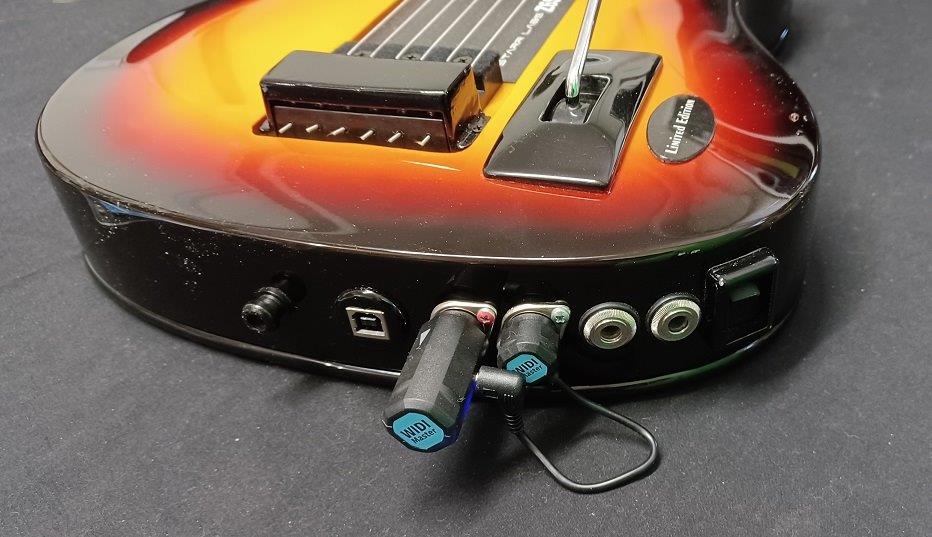
The CME WIDI Master BLE-MIDI wireless accessory is designed for musicians who want to transmit and receive Bluetooth MIDI through the five-pin DIN MIDI ports of a compatible instrument or controller.
The WIDI Master can be a useful option when a musician wants a compact Bluetooth MIDI connection without building a larger wireless system. Starr Labs describes the accessory as a Ztar add-on that can be purchased separately or installed and tested with a qualifying Ztar order.
Key CME WIDI Master Features to Review
- Bluetooth MIDI transmit and receive capability through five-pin DIN MIDI.
- Automatic pairing between compatible WIDI devices.
- Bluetooth 5 connectivity.
- A working range designed for unobstructed environments.
- Low-latency performance between compatible WIDI devices.
- App-supported setup and updates.
When CME WIDI Master May Be a Good Fit
Consider reviewing the CME WIDI Master when your controller and connected equipment use compatible five-pin DIN MIDI ports and you want a compact Bluetooth MIDI link. Before ordering, confirm the MIDI ports, the receiving equipment, the distance involved, and the intended stage or studio environment.
Wireless MIDI for Guitar Controllers in a Ztar Setup
A Ztar MIDI guitar is designed to send MIDI data to compatible equipment through a guitar-style performance interface. Depending on the model and configuration, a Ztar can support string triggers, programmable fretboard zones, buttons, pads, tunings, patches, sensors, and other assigned functions.
A wireless MIDI system can help carry that performance data to the connected sound source while giving the musician more room to move. The wireless product should be selected around the actual Ztar configuration rather than treated as a universal add-on.
Plan the Entire Signal Path
Before selecting a wireless accessory, write down the full path:
- The exact Ztar or guitar-controller model.
- The MIDI or USB output used by the controller.
- The wireless transmitter or adapter.
- The wireless receiver or connected wireless device.
- The computer, synthesizer, sound module, or mobile device receiving MIDI.
- The software instrument or hardware sound source producing audio.
- The final audio-output system.
Musicians comparing advanced controllers can review the Ztar Z6S MIDI guitar controller, the Z7S, and the broader Z6 Series.
Wireless MIDI for Guitar Controllers in a Portable GoTar-3 Setup
The GoTar-3 is designed as a compact MIDI controller for musicians who want a portable guitar-style playing surface. Its streamlined format can be useful for performance, studio work, education, and mobile workflows.
Wireless MIDI may be worth reviewing when a musician wants to reduce cable limitations within a compatible GoTar-3 setup. Confirm the instrument configuration, the connected device, and the correct adapter before planning the connection.
For a detailed overview, read the existing GoTar-3 USB MIDI controller guide. Musicians choosing between product families can also review GoTar vs. Ztar after that comparison page is published.
Bluetooth MIDI for Mobile Guitar Controllers
Mobile musicians may prefer a controller designed around wireless interaction with a tablet, smartphone, or computer. The iTar Mobile guitar controller is designed as an interactive Bluetooth MIDI guitar-style controller for mobile musicians.
The iTar includes a touch-sensitive illuminated fingerboard and is designed to work wirelessly with compatible computers and smartphones or directly over USB. Players considering a mobile setup should review the live product page and confirm the required device, app, and connection details.
How to Choose Wireless MIDI for Guitar Controllers
The correct product depends on the equipment at both ends of the connection. Do not select a wireless accessory based only on the word “MIDI.” Match the accessory to the controller, output type, receiving device, and performance environment.
Step 1: Identify the Controller
Write down the exact guitar-controller model and the available ports. A Ztar, GoTar-3, iTar, or another MIDI controller may require a different connection plan.
Step 2: Identify the Receiving Device
Determine whether the receiving device is a synthesizer, sound module, computer, tablet, smartphone, or another MIDI system.
Step 3: Match the Connection Type
Confirm whether the setup uses five-pin DIN MIDI, USB MIDI, Bluetooth MIDI, or another compatible wireless link.
Step 4: Consider the Performance Environment
A rehearsal room, home studio, recording facility, and live stage can present different requirements. Think about distance, obstacles, nearby wireless devices, cable routing, movement, and the number of wireless links operating in the same space.
Step 5: Confirm Availability and Compatibility
Product availability can change. Review the live product pages and contact Starr Labs before ordering. Use the contact page or call 858-285-0831 with the controller model and a description of the complete setup.
Wireless MIDI for Guitar Controllers: Buyer Checklist
| Question | Why It Matters |
|---|---|
| What exact MIDI guitar controller will be used? | The model and available ports determine which wireless options are worth reviewing. |
| Does the setup use five-pin DIN MIDI or USB MIDI? | A Bluetooth DIN-MIDI adapter and a wireless USB MIDI system solve different connection problems. |
| What equipment will receive the MIDI data? | The receiving synthesizer, computer, tablet, smartphone, or sound module must be compatible. |
| Will the setup be used on stage, in a studio, or while traveling? | The performance environment affects range, cable routing, mobility, and wireless planning. |
| Are several wireless systems operating nearby? | Channel planning and interference management may become more important in a complex environment. |
| Is the product currently available? | Inventory can change, so confirm availability before finalizing the setup. |
Wireless MIDI for Guitar Controllers Frequently Asked Questions
What is Wireless MIDI for Guitar Controllers?
Wireless MIDI for Guitar Controllers is a connection method that carries MIDI performance data without requiring a conventional cable for the selected part of the signal path. The correct accessory depends on the controller and receiving equipment.
Does wireless MIDI create sound?
No. Wireless MIDI carries performance data. A compatible synthesizer, sound module, computer, software instrument, sampler, tablet, or smartphone is still needed to generate sound.
What is the difference between Bluetooth MIDI and wireless USB MIDI?
Bluetooth MIDI and wireless USB MIDI are different connection approaches. A Bluetooth MIDI accessory such as the CME WIDI Master is designed around compatible Bluetooth and five-pin DIN MIDI workflows. Match the product to the ports and devices in the actual setup.
Can I use CME WIDI Master with a Ztar?
Starr Labs presents CME WIDI Master as a Ztar add-on. Confirm the available five-pin DIN MIDI ports, the receiving device, and the complete connection plan before ordering.
Can wireless MIDI work in a studio?
Yes. A compatible wireless system can be useful in a studio when a musician wants more flexible controller placement or fewer long cable runs.
Can wireless MIDI work with mobile devices?
Some compatible setups can work with tablets or smartphones. Confirm the controller, wireless accessory, mobile device, operating system, and required adapters before ordering.
Where can I ask about compatibility and current availability?
Visit the Starr Labs support page, use the contact page, or call 858-285-0831 with the exact controller model and a description of the intended wireless setup.
Ask Starr Labs About Wireless MIDI for Guitar Controllers
Wireless MIDI for Guitar Controllers can improve mobility, simplify cable routing, and give musicians more flexibility on stage or in the studio. The correct solution begins with the actual controller, ports, receiving equipment, distance, and performance environment.
Call Starr Labs at 858-285-0831 to discuss compatibility, product availability, and wireless MIDI options. You can also send a message through the Starr Labs contact page, review the Starr Labs MIDI gear page, or sign up for product news, specials, setup tips, and upgrade information.