
What Is a ZBass MIDI Controller?
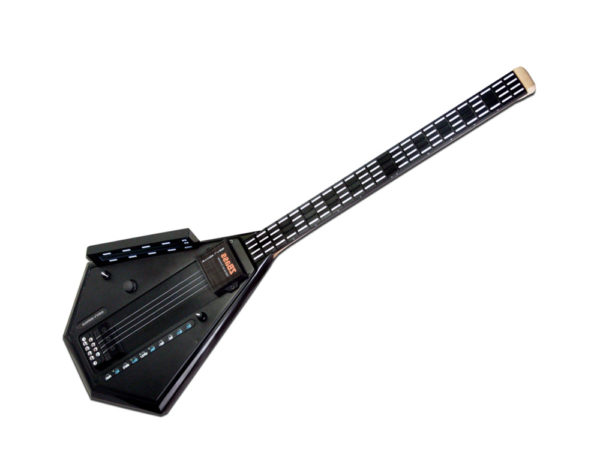
What Is a ZBass MIDI Controller? It is a purpose-built MIDI bass guitar controller created for bass players who want to control synthesizers, samplers, sound modules, software instruments, and digital audio workstations from a bass-oriented performance interface. Instead of requiring a conventional bass MIDI pickup to interpret vibrating strings, the ZBass uses a four-string, 24-fret touch-sensitive keyed-fingerboard with velocity-sensitive string triggers.
The result is a MIDI controller designed specifically for bass players who want to move beyond conventional bass tones. A musician can use the ZBass to perform synth bass lines, trigger layered sounds, control virtual instruments, experiment with alternate tunings, map percussion sounds, create chordal parts, and integrate a bass-style controller into a live or studio MIDI setup.
The ZBass belongs to the wider family of Starr Labs Ztar MIDI guitar controllers. While many Ztar instruments are designed around guitar-oriented performance, the ZBass adapts the Starr Labs approach to the needs of bass players.
What Is a ZBass MIDI Controller Used For?
A ZBass is designed to send MIDI performance data to compatible hardware and software. The controller itself is the performance interface. The connected synthesizer, software instrument, sampler, sound module, or digital audio workstation provides the sounds.
Bass players can use the ZBass for:
- Playing software synthesizers from a bass-oriented interface.
- Controlling hardware synthesizers and sound modules.
- Recording editable MIDI performances inside a DAW.
- Triggering samples, percussion sounds, loops, and sequences.
- Creating layered bass and synth arrangements.
- Using alternate tunings without physically retuning a conventional bass.
- Assigning different sounds and functions to separate fingerboard areas.
- Building live-performance setups around MIDI control.
Musicians who want a broader introduction to Starr Labs instruments can explore the Starr Labs MIDI controllers page and the existing Ztar MIDI guitar overview.
What Makes a ZBass MIDI Controller Different From a Traditional Bass?
A traditional bass guitar produces sound through vibrating strings, pickups, amplification, and effects. A ZBass is a digital MIDI controller. It is designed to tell connected MIDI equipment which notes and performance commands to play.
A Touch-Sensitive Keyed Fingerboard
The ZBass uses a four-string by 24-fret touch-sensitive keyed-fingerboard. Pressing the keyed fingerboard sends note information directly to the MIDI system. This creates a different workflow from a standard bass guitar fitted with a pitch-detection pickup.
No Conventional Bass MIDI Pickup Required
A bass player does not need to add a traditional bass MIDI pickup to use the ZBass. The controller is built around direct MIDI performance. This can help musicians avoid relying on a separate pitch-conversion process.
Polyphonic Performance Possibilities
The ZBass supports polyphonic performance. Musicians can play multiple notes and build parts that go beyond a standard one-note-at-a-time bass role. This can be valuable for layered arrangements, chordal textures, percussion mapping, and experimental electronic music.
What Is a ZBass MIDI Controller With 32 Programmable Zones?
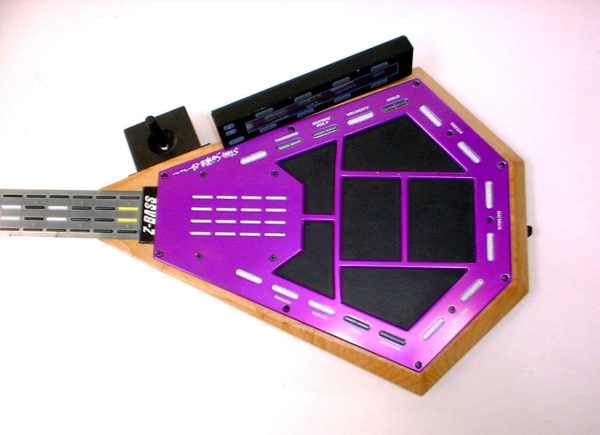
One of the most important ZBass features is its programmable fingerboard. The fingerboard supports 32 separate zones. Each zone can be configured around a specific performance goal.
A programmable zone may be assigned its own:
- MIDI channel.
- Voice or sound source.
- Transposition.
- Tuning.
- Hammer-on behavior.
- Sensitivity settings.
Use Different Sounds Across the Fingerboard
A player can build a setup where the lower region of the fingerboard controls one sound and another region controls a different instrument or function. For example, a musician may want a synth-bass sound in one area and a sampled texture, percussion map, or layered instrument in another.
Create Alternate Tunings
The strings can use programmable tunings, and the individual fingerboard keys can also be configured independently. This gives bass players a way to experiment with alternate musical layouts without rebuilding a conventional instrument around a physical tuning change.
Build Drum Maps and Loop-Triggering Setups
The keyed-fingerboard can be used for more than melodic bass parts. A musician can assign percussion sounds, trigger loops, or use different areas of the fingerboard for composition and performance tools.
ZBass MIDI Controller Features
The ZBass is designed as a full MIDI-performance instrument rather than a basic bass-to-MIDI converter. Its feature set supports bass players who want control over notes, sounds, tunings, pedals, sequences, and expressive performance functions.
| Feature | How It Supports the Musician |
|---|---|
| Four Velocity-Sensitive String Triggers | Allows bass players to use a string-trigger performance approach while sending MIDI information. |
| Four-Way Programmable Joystick | Provides an expressive control surface for assigned MIDI functions. |
| Wood Neck-Stock | Supports a bass-oriented instrument format. |
| Programmable Tunings | Allows musicians to configure string and fingerboard tunings for different songs and creative workflows. |
| 32 Mappable Zones | Makes it possible to divide the fingerboard into multiple areas with different MIDI assignments. |
| Programmable Chording System | Supports chordal parts, layered arrangements, and expanded compositional possibilities. |
| Arpeggiator | Helps musicians create repeating note patterns and rhythmic synth parts. |
| Sequencer | Supports programmed musical patterns and performance arrangements. |
| Volume and Sustain Pedal Ports | Adds hands-free expressive control during performance. |
| MIDI and USB Connections | Supports integration with compatible hardware, software, and computer-based setups. |
What Is a ZBass MIDI Controller for Live Performance?
A live performer needs more than a long feature list. The controller must support the way the musician moves through a set. The ZBass can be useful for bass players who want to switch sounds, trigger additional layers, use programmed zones, and control MIDI equipment from a bass-oriented instrument.
Control Multiple Sounds From One Instrument
A ZBass can support a performance where one part of the fingerboard plays a bass sound while another area triggers a different instrument, percussion sample, sequence, or effect. This can help one musician cover a broader musical role without moving to a separate keyboard controller.
Use Pedals for Expressive Control
Volume and sustain pedal ports allow musicians to control assigned functions without removing their hands from the instrument. This can be useful during live performances where fast adjustments matter.
Plan Wireless MIDI Carefully
A bass player building a mobile stage setup may want to review compatible wireless MIDI products. Depending on the complete signal path, musicians can explore the CME WIDI Master BLE-MIDI wireless accessory, or optional on-board BLE-MIDI connectivity.
Confirm compatibility before ordering a wireless product. The correct option depends on the available ports, receiving device, stage layout, and performance environment.
What Is a ZBass MIDI Controller for Studio Recording?
The ZBass can also serve as a studio controller for musicians who want to record and edit MIDI performances. A connected DAW can capture the MIDI information, allowing the musician to refine the arrangement after the performance is recorded.
Record Editable MIDI Bass Parts
A recorded MIDI part can be edited, transposed, reassigned to another sound, layered with a different instrument, or adjusted to fit the arrangement. This can be useful when creating synth-bass parts, electronic-music tracks, film cues, game music, and experimental compositions.
Control Software Instruments
The ZBass can be used with compatible virtual instruments and software synthesizers. A producer can explore sounds that extend far beyond a conventional electric-bass tone.
Use Zones for Composition
The programmable zones can support different musical roles within one instrument. A musician may use one zone for a bass sound, another for chords, and another for percussion or loop triggering.
What Is a ZBass MIDI Controller Compared With a Bass MIDI Pickup?
A conventional bass MIDI setup may begin with a traditional bass guitar fitted with a specialized pickup and a system that interprets the instrument’s performance. The ZBass uses a purpose-built keyed-fingerboard and velocity-sensitive string triggers designed around direct MIDI control.
| Comparison Point | ZBass MIDI Controller | Traditional Bass With MIDI Pickup System |
|---|---|---|
| Instrument Design | Purpose-built MIDI bass guitar controller | Conventional bass adapted with additional MIDI hardware |
| Fingerboard | Four-string by 24-fret touch-sensitive keyed-fingerboard | Traditional bass fretboard |
| MIDI Approach | Direct MIDI controller workflow | Depends on the selected pickup and conversion system |
| Programmable Zones | Supports 32 mappable zones | Depends on the connected system |
| Best Fit | Bass players who want a dedicated digital MIDI-performance instrument | Bass players who want to adapt an existing traditional bass |
Who Should Consider a ZBass MIDI Controller?
The ZBass is not intended only for one genre or one type of musician. It can be useful whenever a bass-oriented interface is preferable to a standard keyboard controller.
Electronic Musicians
Electronic musicians can use the ZBass to control synth basses, textures, samples, loops, arpeggiators, and sequences.
Live Bass Players
Live performers can use the controller to expand beyond a conventional bass role while keeping a bass-oriented instrument in their hands.
Studio Producers
Producers can record editable MIDI data and control software instruments from a familiar bass-oriented format.
Experimental Composers
The programmable fingerboard, alternate tunings, chording system, zones, and percussion-mapping possibilities can support unconventional arrangements and sound-design workflows.
Bass Players Exploring MIDI for the First Time
A bass player who does not want to begin with a conventional keyboard controller may prefer an instrument designed around a bass-playing perspective.
Questions to Ask Before Ordering a ZBass MIDI Controller
The right controller depends on the musician’s equipment, performance style, and goals. Before ordering, consider:
- Will the ZBass be used primarily for live shows, studio recording, composition, sound design, or education?
- Which synthesizer, sound module, software instrument, sampler, or DAW will receive the MIDI data?
- Are programmable fingerboard zones important?
- Will the musician use bass lines, chordal parts, percussion maps, sequences, or layered sounds?
- Are volume and sustain pedals part of the planned setup?
- Is USB MIDI, traditional MIDI, or a compatible wireless MIDI connection required?
- Does the setup require additional custom options?
- Is the ZBass currently available for ordering?
Review the live ZBass product page, compare the Starr Labs price list, or use the contact page to describe the intended setup.
What Is a ZBass MIDI Controller? Frequently Asked Questions
What Is a ZBass MIDI Controller?
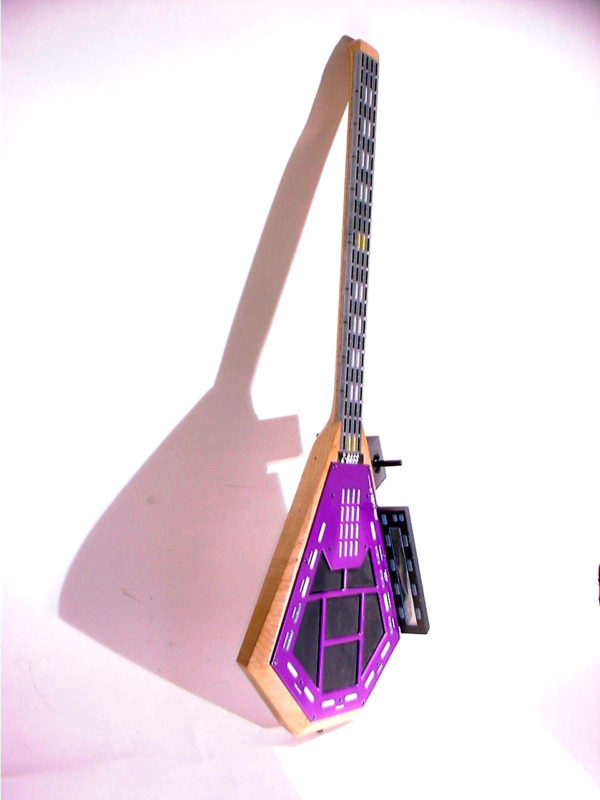
A ZBass is a MIDI bass guitar controller created by Starr Labs. It uses a four-string, 24-fret touch-sensitive keyed-fingerboard and velocity-sensitive string triggers to control compatible synthesizers, samplers, sound modules, software instruments, and DAWs.
Does the ZBass produce sound on its own?
The ZBass is designed as a MIDI controller. Plan to connect it to a compatible synthesizer, software instrument, sound module, sampler, or DAW that provides the sounds used during performance or recording.
Does the ZBass need a bass MIDI pickup?
No. The ZBass is built as a dedicated MIDI bass controller, so a conventional bass MIDI pickup is not required.
How many strings and frets does the ZBass have?
The ZBass uses a four-string by 24-fret touch-sensitive keyed-fingerboard.
How many programmable zones does the ZBass support?
The ZBass supports 32 programmable zones. Each zone can be configured with its own channel, voice, transposition, tuning, hammer-on behavior, and sensitivity settings.
Can the ZBass play chords?
Yes. The ZBass includes a programmable chording system and supports polyphonic performance possibilities beyond a conventional one-note-at-a-time bass workflow.
Does the ZBass include an arpeggiator and sequencer?
Yes. The ZBass feature set includes an arpeggiator and a sequencer for building patterns and performance arrangements.
Can the ZBass work with a DAW?
Yes. The ZBass can send MIDI information to a compatible digital audio workstation for recording, editing, and software-instrument control.
Can the ZBass control hardware synthesizers?
Yes. The ZBass can control compatible hardware synthesizers, samplers, sound modules, and other MIDI-capable equipment.
Can the ZBass be customized?
Starr Labs notes that custom options are available for its instruments. Explain your required controls and performance goals when contacting Starr Labs so the appropriate options can be reviewed.
Is the ZBass currently in stock?
Availability can change. Review the live ZBass product page or contact Starr Labs directly before planning an order.
Where can I ask questions about a ZBass MIDI Controller?
Visit the MIDI controller questions page, review the Starr Labs support resources, or use the contact page to describe your equipment and performance goals.
Ask Starr Labs: What Is a ZBass MIDI Controller?
What Is a ZBass MIDI Controller? It is a dedicated MIDI bass guitar controller designed for bass players who want high-speed digital control, programmable zones, expressive string triggers, alternate tunings, pedal support, and access to a much broader range of sounds than a conventional bass setup can provide by itself.
Call Starr Labs at 858-285-0831 to discuss the ZBass, current availability, MIDI connections, custom options, and your intended setup. You can also send a message through the Starr Labs contact page, browse the Starr Labs MIDI controllers, explore the Ztar MIDI guitar controller category, or sign up for product news, setup tips, specials, and upgrade information.