
How to Choose Replacement Parts for Older Starr Labs Instruments
How to Choose Replacement Parts for Older Starr Labs Instruments begins with identifying the exact controller, documenting its current configuration, and deciding whether the instrument needs maintenance, a replacement component, or a performance upgrade. An older Ztar can remain a valuable part of a musician’s live rig or recording setup when the correct part is matched to the correct instrument.
Starr Labs instruments are not generic controllers. Different models may use different string-trigger systems, electronics, connection methods, performance controls, and optional components. A part that is useful for one Ztar should not automatically be treated as compatible with every older instrument.
This guide explains how to make an informed decision, avoid unnecessary purchases, and contact Starr Labs when compatibility needs to be confirmed. For technical manuals, setup documents, troubleshooting materials, and string-replacement information, visit the Starr Labs support page.
How to Choose Replacement Parts for Older Starr Labs Instruments by Model
The first step is identifying the instrument accurately. Before ordering a replacement component, locate the model name and document the existing setup. This helps determine whether the instrument requires a direct replacement, an updated component, an optional accessory, or professional support.
Record the Exact Instrument Name
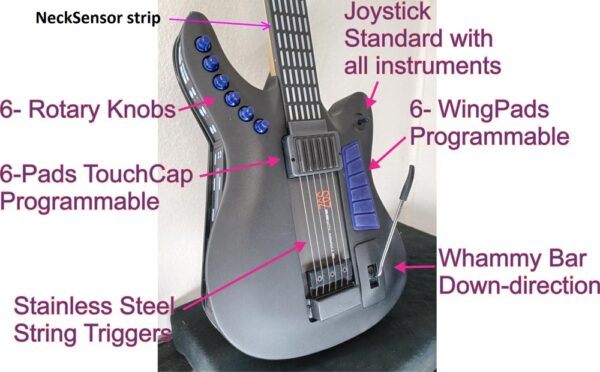
Write down the model name and any available revision information. Older Starr Labs instruments may include different Ztar configurations, Z6S models, Z7S models, MiniZS instruments, keyboards, wireless systems, and custom-built controllers.
For help identifying a Ztar configuration, review the Ztar MIDI guitar overview, the Ztar MIDI guitar controller guide, the Z6 Series page, and the Ztar MIDI guitar options page.
Photograph the Existing Hardware
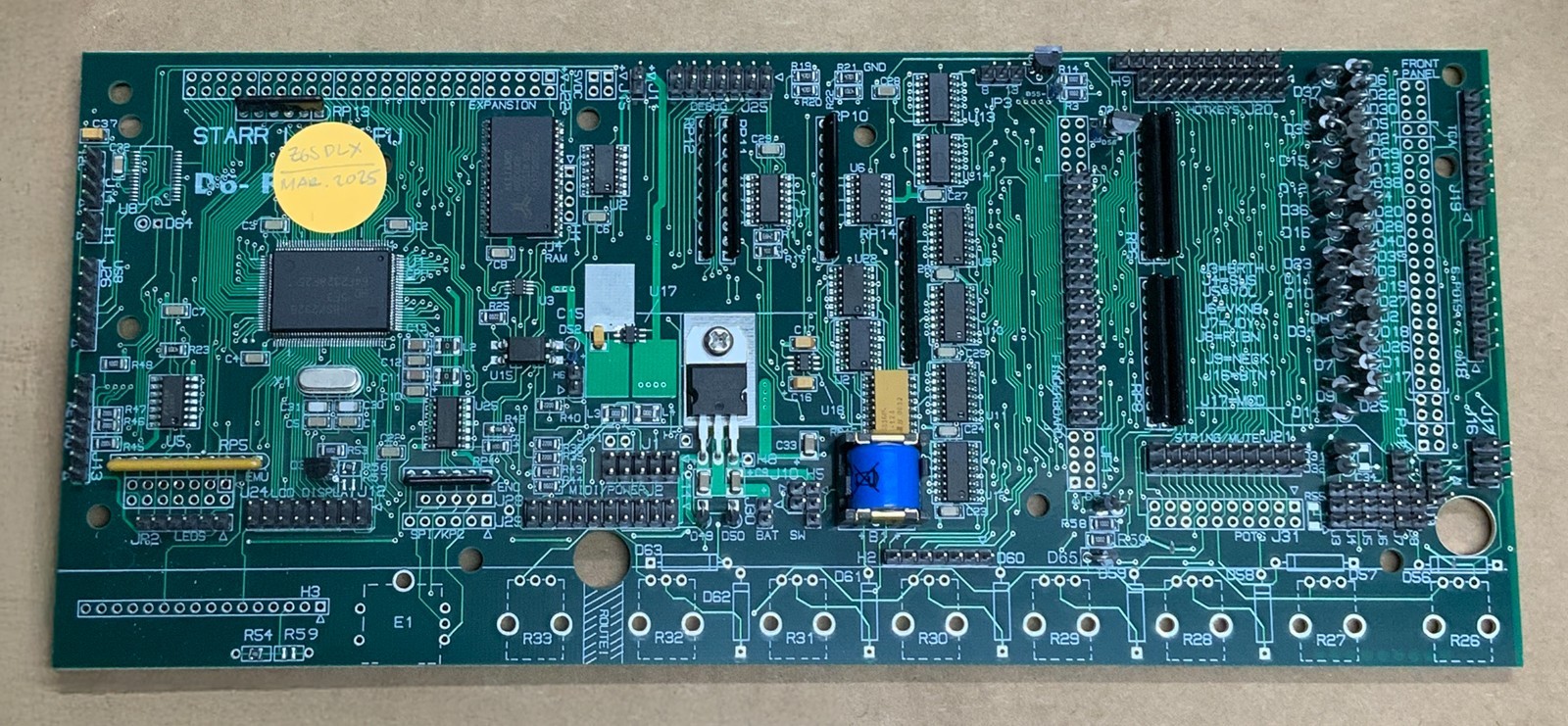
Take clear photographs before removing any part. Include the full instrument, the controls, the connector panel, the string-trigger area, the existing circuit board when accessible, and the component that may need attention. Photographs can help Starr Labs determine whether a listed part fits the instrument.
Describe the Problem Before Choosing the Part
A customer should explain what the instrument is doing before assuming that a specific component needs to be replaced. The issue may involve maintenance, a setting, a worn component, a connection problem, or a useful upgrade opportunity.
- Are notes failing to trigger consistently?
- Are unwanted notes appearing during performance?
- Is a button, pad, sensor, or connector responding incorrectly?
- Does the setup need a wireless MIDI option?
- Would an updated preamp card improve an older string-trigger system?
- Is the goal a repair, an upgrade, or a new performance capability?
How to Choose Replacement Parts for Older Starr Labs Instruments Without Guessing
A replacement part should solve a specific problem. An accessory should add a clearly defined capability. A performance upgrade should provide a real improvement for a compatible instrument. Treat these as separate decisions.
| Customer Need | Type of Solution | Recommended Next Step |
|---|---|---|
| Replace worn or damaged strings | Maintenance or replacement procedure | Review the official string-replacement guide on the support page |
| Improve the response of compatible older steel string triggers | Performance upgrade | Ask whether the Rev3 string-trigger preamp matches the instrument |
| Add touch-sensitive performance controls | Optional accessory | Ask whether the TCA-1 Trigger Cap assembly fits the Ztar configuration |
| Reduce cables in a compatible MIDI setup | Wireless MIDI accessory | Review the connection type and compatible wireless options |
| Replace an unclear or unlisted component | Compatibility review | Send photographs and the model information to Starr Labs |
| Add several new performance controls | Upgrade plan or new configuration comparison | Compare targeted upgrades with available Ztar options |
Replacement Strings and String-Trigger Maintenance
The Ztar string triggers do not require replacement. Unlike a full-size guitar string that has a crisper sound when new, the short Ztar strings re only ued to sense your right-hand picking techniques and produce no sound. In fact the strings have physical damping felts to prevent excessive ringing and double triggering.String-trigger tension, settings, and installed electronics can all influence the response of the instrument, but unless a string breaks there’s no need for replacement.
Review the Official String-Replacement Guide
The Starr Labs support page includes a guide for mounting new Ztar strings and completing string replacement. Review the official documentation before removing or replacing strings.
Before beginning, document:
- The exact Ztar model.
- Any settings that may need to be tested after replacement.
Test the Instrument After Maintenance
After completing maintenance, test one area at a time. Confirm that the strings respond consistently and that the MIDI output behaves as expected. If performance changes unexpectedly, review the setup documentation or contact Starr Labs before making several adjustments at once.
How to Choose a String-Trigger Upgrade for an Older Ztar
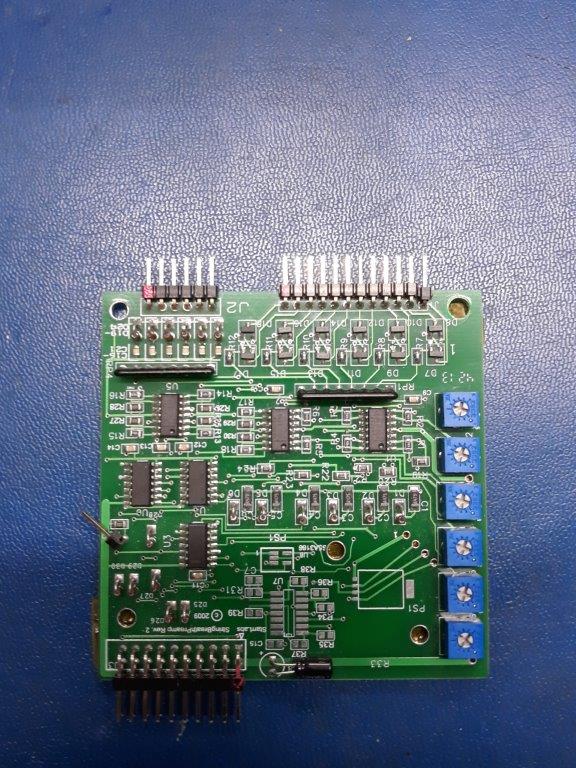
Some older Ztar instruments with compatible steel string triggers may benefit from the Upgrade String Trigger Preamp for older Ztars. Starr Labs describes the Rev3 preamp card as a drop-in replacement intended for existing customers with qualifying Z6S, Z7S, MiniZS, and other Ztar instruments that use steel string triggers.
The purpose of this upgrade is to improve string-trigger performance while simplifying setup. It is not a universal replacement for every Starr Labs instrument. Confirm the exact model and hardware before ordering.
Ask These Questions Before Ordering the Rev3 Preamp Card
- Is the controller a compatible Z6S, Z7S, MiniZS, or another qualifying Ztar?
- Are international shipping details required?
Inventory status can change. Review the live product page and call Starr Labs at 858-285-0831 before planning an installation.
How to Choose Replacement Parts for Older Starr Labs Instruments With Additional Controls
Some musicians are not replacing a failed part. They are expanding the expressive capabilities of an older Ztar. In that case, the correct solution may be an optional accessory rather than a direct replacement component.
Review the TCA-1 Trigger Cap Assembly
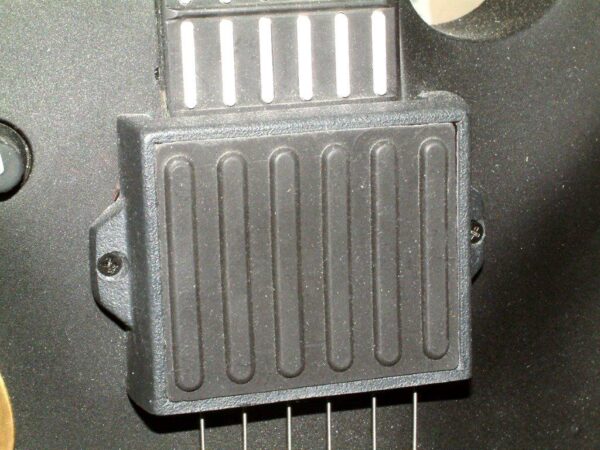
The TCA-1 Trigger Cap assembly is designed as a six-sensor touch-sensitive TriggerPad set that mounts above the StringTrigger pickup on a compatible Ztar setup.
Depending on the programmed configuration, the pads can be used for:
- Triggering notes or chords.
- Responding to the force of the player’s touch.
- Sending MIDI continuous-controller messages.
- Controlling volume, modulation, or pitch bend.
- Launching clips or sequences.
- Capturing and playing back chords.
- Adding a keyboard-style performance surface.
Confirm Whether an Accessory Fits the Existing Configuration
An expressive-control accessory should be selected around the instrument and the musician’s workflow. Before ordering, explain how the Ztar is currently used and what additional capability is needed.
How to Choose Replacement Parts for Older Starr Labs Instruments With Wireless MIDI
A wireless accessory is not usually a replacement for an internal component. It is an optional way to change the connection path between compatible MIDI equipment. This distinction matters when planning an older-instrument setup.
Review the CME WIDI Master BLE-MIDI Wireless Accessory
The CME WIDI Master BLE-MIDI wireless accessory is designed for compatible five-pin DIN MIDI connections. It can be considered when a musician wants a Bluetooth MIDI connection within an appropriate setup.
Before ordering, confirm:
- The exact instrument model.
- The MIDI ports available on the controller.
- The device that will receive MIDI data.
- The intended stage, studio, or mobile environment.
- Whether a Bluetooth MIDI accessory or another wireless MIDI option is the better fit.
Musicians comparing other wireless products can review the AirPower2, AirPower2 Stick, and AirPower3 pages.
How to Compare Replacement Parts With a New Ztar Configuration
A targeted replacement can be the most practical answer when the older instrument still fits the musician’s needs. However, a player considering several new controls, expanded MIDI functions, wireless options, and additional upgrades may benefit from comparing the existing instrument with a newer configuration.
The Options for Ztar Z6S-DLX page provides a visual overview of a Ztar configuration with multiple installed options. The Ztar MIDI guitar options page also highlights performance upgrades and available configuration ideas.
Choose a Targeted Replacement When:
- At any time feel free to email info@starrlabs.com or call our crack service support team for advice if you have a problem or want an update.
Compare a New Configuration When:
- The musician wants several expanded performance controls.
- The existing instrument no longer matches the intended workflow.
- The desired setup requires a different combination of sensors, triggers, connections, or programmable controls.
- The cost and complexity of several upgrades should be compared with a newer instrument.
Step-by-Step Process for Choosing Replacement Parts
-This is an everly thorough list but following it can remove questions later and streamline the process in general –
Step 1: Identify the Instrument
Record the full model name, approximate age, hardware configuration, and any previous upgrades.
Step 2: Document the Issue
Describe the symptom clearly. Include photographs and explain when the issue occurs.
Step 3: Review the Support Resources
Visit the support page for manuals, string-replacement information, setup documentation, troubleshooting resources, and wireless-connection guides.
Step 4: Review the Relevant Product Page
Use the product page to understand the intended purpose of the component. Do not treat a listed accessory as universally compatible.
Step 5: Confirm Compatibility
Use the contact page or call 858-285-0831. Include the model name, photographs, and a clear explanation of the repair or upgrade goal.
Step 6: Confirm Availability
Review the live product page before ordering. Availability and shipping details can change.
Step 7: Install Carefully
Follow the correct instructions for the specific model. Power down the instrument, disconnect cables, document the original component position, and stop when an installation step is unclear.
Step 8: Test the Instrument Methodically
Test the controller after installation. Review one function at a time so that any new issue can be isolated quickly.
Replacement-Part Buyer Checklist
| Question | Why It Matters |
|---|---|
| What is the exact Starr Labs model? | Compatibility depends on the instrument and its configuration. |
| Is the goal maintenance, repair, or an upgrade? | These are different decisions and may require different products. |
| Does the Ztar use steel string triggers? | All “strung” |
| Are photographs available? | Clear photographs can help identify the correct component and existing configuration. |
| Has the support documentation been reviewed? | A manual or troubleshooting guide may answer the question before a part is ordered. |
| Has compatibility been confirmed? | Best to check with the factory. |
| Is the part currently available? | Inventory and shipping details can change. |
How to Choose Replacement Parts for Older Starr Labs Instruments: Frequently Asked Questions
Are replacement parts interchangeable between Starr Labs instruments?
Sometims. Compatibility depends on the model, revision, trigger system, and configuration. Older instruments had different electronics and different StringTrigger pickups and pickups, but the StringPreamp replacement does improve the performance of an older instrument even if it has the old somewhat slower CPU
Where can I find string-replacement information?
The Starr Labs support page includes a Ztar string-trigger guide for mounting new strings and string replacement. There is also information about this on Youtube.
Which older Ztars may qualify for the Rev3 string-trigger preamp upgrade?
Starr Labs identifies compatible Z6S, Z7S, MiniZS, and other Ztar instruments with steel string triggers as potential candidates. Confirm the exact model and hardware before ordering as mounting considerations may vary.
Is the TCA-1 a replacement part?
The TCA-1 is an optional touch-sensitive TriggerPad assembly for compatible Ztar setups. It is intended to add expressive controls and is sort of the MIDI “kitchen sink” as far as the types of controls it offers. In Ztars without the TCA already installed,the TCA1 will replace the existing cover cap over the String pickup assembly.
Can I add wireless MIDI to an older instrument?
Wireless MIDI may be possible within a compatible setup. Review the controller ports, receiving equipment, and appropriate wireless accessory before ordering. Adding embedded wireless, or USB where there is noe currently installed, may be a bit more complex for older instruments due to hand-wiring required for the older electonics.
What should I do when the required part is not listed online?
Contact Starr Labs with the model name, photographs, and a description of the issue. We’re here to help.
Where can I browse available Starr Labs products?
Visit the Starr Labs shop, review the current in-stock products, or explore the Starr Labs MIDI gear page.
How can I ask for replacement-part guidance?
Use the contact page or call or text Starr Labs at 858-285-0831. Include the instrument model, photographs, and a clear explanation of the maintenance, repair, or upgrade goal.
Ask Starr Labs How to Choose Replacement Parts for Older Starr Labs Instruments
How to Choose Replacement Parts for Older Starr Labs Instruments is easier when the decision begins with the model, current configuration, and intended result. The correct solution may be a replacement procedure, a compatible upgrade, an expressive-control accessory, a wireless MIDI option, or a new configuration comparison.
Call Starr Labs at 858-285-0831 to discuss replacement parts, compatibility, availability, and installation questions. You can also send a message through the Starr Labs contact page, visit the support resources, browse the online shop, or sign up for product news, setup tips, specials, and upgrade information.