
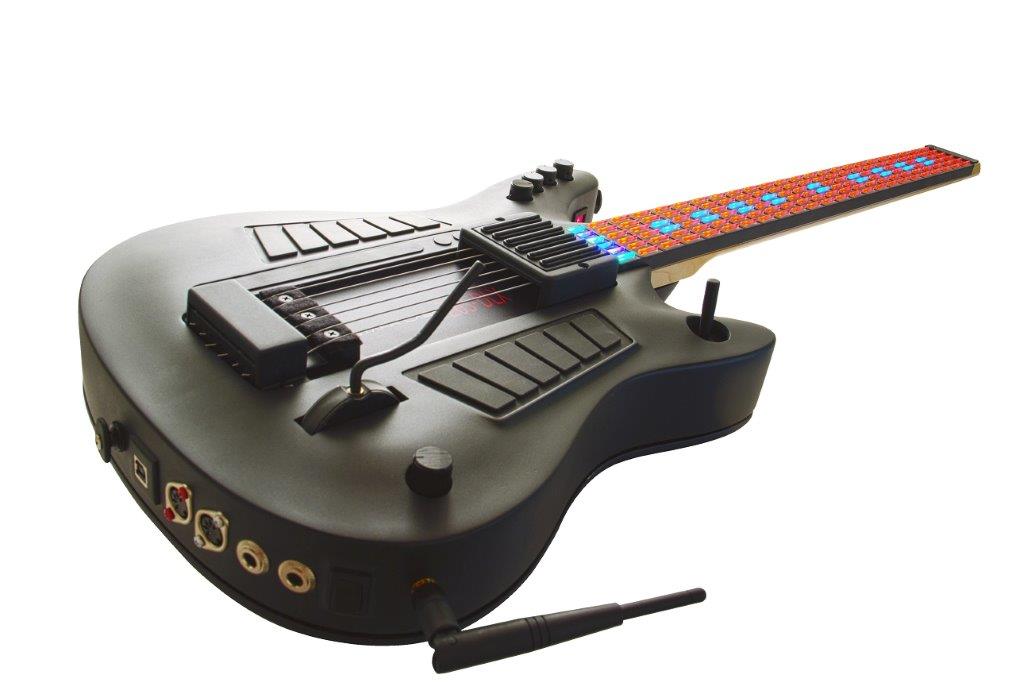
Left-Handed MIDI Guitar Controllers for Musicians Who Need the Right Fit
Left-Handed MIDI Guitar Controllers give left-handed musicians a practical way to control synthesizers, software instruments, samplers, sound modules, and digital audio workstations from an instrument that better matches their playing orientation. A controller should support the musician’s technique instead of forcing the player to adapt to a layout that feels unnatural.
Choosing a left-handed MIDI guitar controller involves more than reversing the body shape. The player should consider fingerboard orientation, trigger placement, programmable tuning, performance controls, instrument size, connectivity, customization options, and the type of music the controller will support.
Starr Labs offers several options for left-handed musicians. These include dedicated left-handed Z6 Series configurations, programmable tuning options, compact controller possibilities, and GoTar configurations for players who want a portable MIDI instrument.
This guide explains how to compare Left-Handed MIDI Guitar Controllers, identify the most relevant Starr Labs options, and contact Starr Labs before placing an order.
Why Left-Handed MIDI Guitar Controllers Matter
A left-handed player may be able to use some electronic instruments in a right-handed orientation, but that does not mean the experience will be comfortable or practical. A musician who performs regularly should choose a setup that supports natural hand placement, efficient access to controls, and a playing position that makes sense on stage and in the studio.
Comfort Supports Better Performance
A controller that fits the musician can make it easier to focus on timing, expression, patch changes, tapping, strumming, picking, and MIDI control. The goal is to reduce avoidable obstacles so the performer can concentrate on the music.
Control Placement Affects the Workflow
Buttons, knobs, triggers, joysticks, pedal ports, touch pads, and other controls should be reviewed carefully. A left-handed musician may need a body layout and control arrangement that supports the way the instrument is actually played.
Programmable Tuning Adds Flexibility
A Starr Labs Ztar can be programmed for different tunings. Left-handed musicians should consider both the physical orientation of the controller and the available tuning options before deciding which model is appropriate.
Left-Handed MIDI Guitar Controllers From Starr Labs
Starr Labs offers several paths for musicians comparing Left-Handed MIDI Guitar Controllers. The best option depends on whether the player wants a dedicated left-handed body, a programmable tuning change, a compact controller, or a customized instrument.
| Controller Option | Left-Handed Approach | Best Next Step |
|---|---|---|
| Z6S-Pro DLX (Lefty) | Dedicated left-handed Z6S configuration with programmable controls and available options | Review the live product page and confirm the desired configuration |
| Z6 Series | Available for left-handed musicians with model-specific planning | Compare the available Z6 Series instruments and contact Starr Labs |
| MiniZ | Can be fabricated as a left-handed compact instrument | Ask about the intended playing style and available configuration |
| GoTar-3 | Supports right-handed or left-handed setup selection and can be produced with a left-handed shell | Review the GoTar guide and confirm the current order options |
| Symmetrical Diamond-Shaped Instruments | Symmetrical body design can serve left-handed musicians | Contact Starr Labs to discuss the available models and setup requirements |
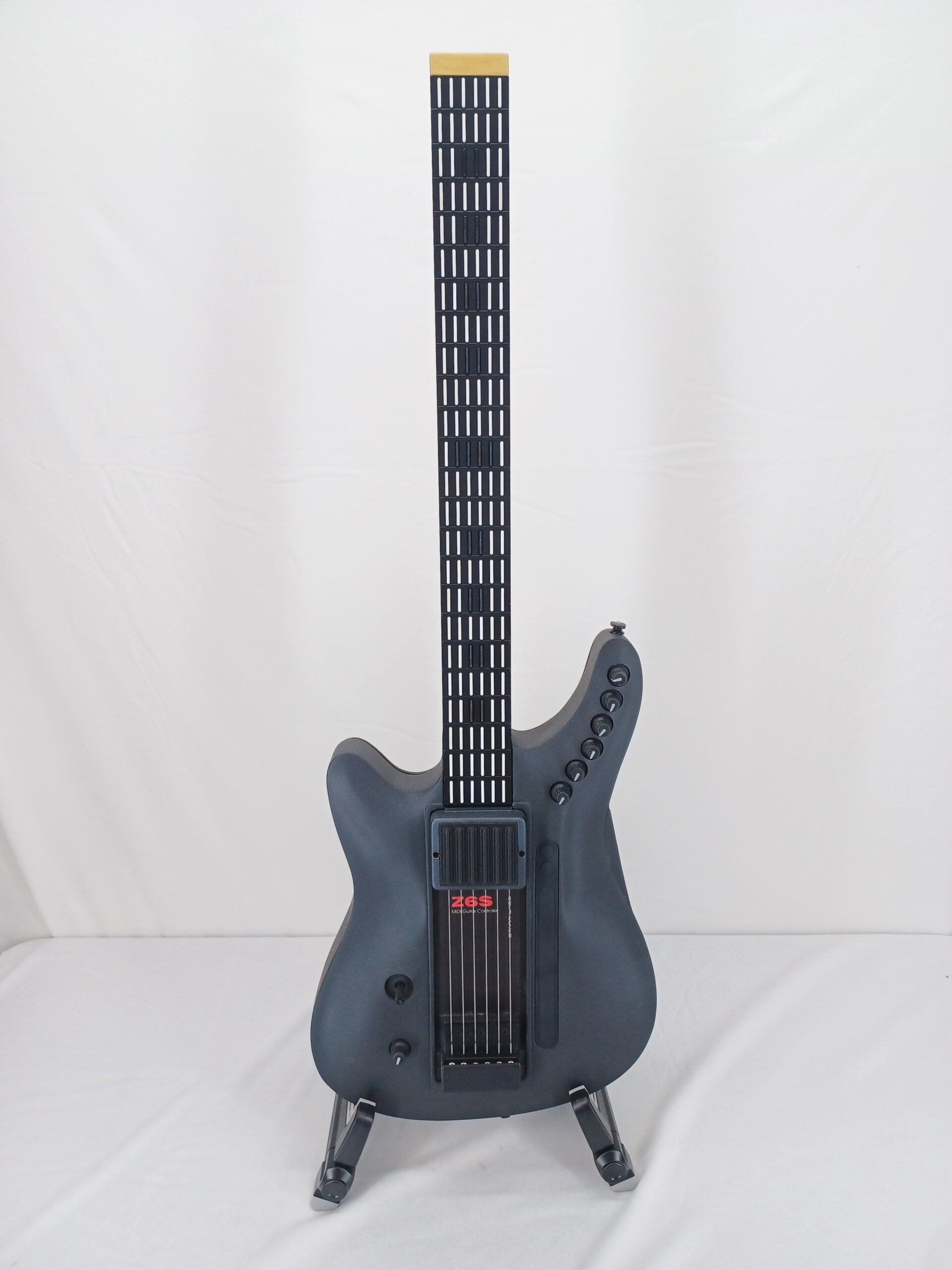
Z6S-Pro DLX Left-Handed MIDI Guitar Controller
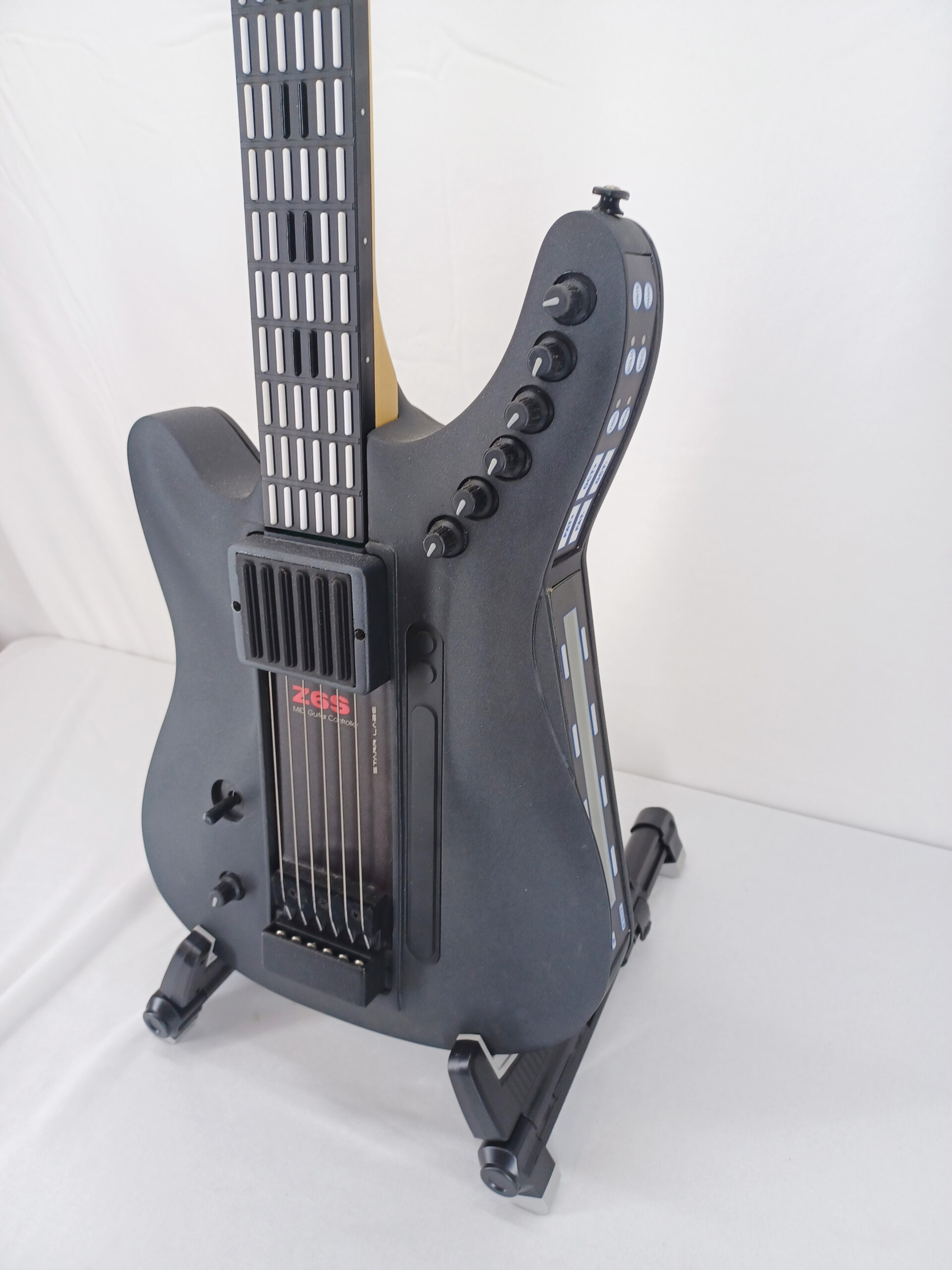
The Z6S-Pro DLX Lefty is a dedicated option for musicians who want an advanced left-handed Ztar configuration. It is designed for players who need a guitar-style MIDI controller with programmable controls and a layout built around left-handed performance.
The Z6S-Pro DLX Lefty includes:
- A left-handed instrument layout.
- A 24-fret programmable touch-sensitive fingerboard.
- Six programmable touch-sensitive string triggers.
- A four-way programmable joystick.
- A programmable volume control.
- Programmable sustain and volume pedal ports.
- An embedded programming system that does not require separate programming software.
Choose the Configuration Around the Music
The Z6S-Pro DLX name describes a configurable Z6S with selected options. Not every option can necessarily be installed together on the same instrument because the available physical space matters. Before ordering, explain the intended workflow and confirm which combination of controls makes sense.
Musicians can also compare the wider Z6 Series, review the Ztar Z6S MIDI guitar controller, and explore the available Ztar MIDI guitar options.
Left-Handed MIDI Guitar Controllers for Strumming, Picking, and Tapping
The correct controller should match the musician’s preferred technique. Some left-handed players want a familiar guitar-oriented approach. Others want to tap the fingerboard like a keyboard. Some musicians need both.
String-Trigger Performance
A Z6S configuration can use touch-sensitive string triggers to capture finger-style and pick-based techniques. The player can use the instrument as a digital MIDI-performance controller rather than relying on a conventional guitar pickup to interpret vibrating-string pitch.
Keyboard-Style Fingerboard Tapping
A touch-sensitive keyed fingerboard can also be played through direct tapping. This allows musicians to explore techniques that extend beyond traditional guitar playing, including two-handed performance, layered parts, and alternate layouts.
Hybrid Playing Styles
A musician may want to move between tapping and strumming-oriented techniques during the same set. The appropriate controller should support the performance style rather than force the player into a single method.
For a broader explanation of the product family, read the Ztar MIDI guitar overview and the Ztar MIDI guitar controller guide.
Left-Handed MIDI Guitar Controllers With Programmable Tunings
Physical orientation is important, but tuning flexibility is also part of the decision. Starr Labs Ztars can be programmed for different tunings, which gives musicians more control over the relationship between the fingerboard and the sounds being played.
Use a Left-Handed Tuning Setup
A right-handed Ztar can use a left-handed tuning selection through its menu system. This may be useful for some musicians who already own an instrument or who want to explore a different playing orientation.
Choose a Dedicated Left-Handed Body When Appropriate
A tuning change does not automatically replace the value of a dedicated left-handed layout. The correct decision depends on control placement, comfort, body shape, performance technique, and whether the instrument is being ordered for long-term live use.
Ask About Custom Configuration Details
A left-handed musician should describe the intended playing style before ordering. Explain whether the controller will be used for tapping, strumming, picking, layered MIDI arrangements, software instruments, hardware synthesizers, or a combination of several applications.
Compact Left-Handed MIDI Guitar Controllers
Not every musician needs a full-size advanced Z6S configuration. Some players want a smaller instrument for portability, practice, two-handed tapping, education, or mobile production.
MiniZ Left-Handed Options
The MiniZ can be fabricated as a left-handed instrument. It is worth reviewing when a compact layout and tapping-oriented performance style are important.
GoTar-3 Left-Handed Setup
The GoTar-3 is a portable MIDI controller with a 24-fret velocity-sensitive fingerboard. It supports tapping and strumming-style performance. The EDIT interface allows the player to select a right-handed or left-handed setup.
For a detailed introduction, review the existing GoTar-3 USB MIDI controller guide.
Compare Portability With Customization
A compact controller may be the right choice when portability is the priority. A larger Ztar configuration may be more appropriate when the musician needs additional controls, programmable zones, string triggers, pedal ports, sensors, wireless options, or a customized live-performance system.
Left-Handed MIDI Guitar Controllers for Live Performance
A live performer should evaluate how the instrument works under real performance conditions. The controller should support fast access to the sounds and functions that matter during a set.
Review the Control Layout
Think about where the player’s hands will rest and how quickly the musician can reach the controls. A useful live-performance layout may include triggers, knobs, a joystick, pedal ports, touch pads, patch controls, tunings, and MIDI assignments.
Plan the Connected Sound Source
A MIDI guitar controller sends performance information to compatible equipment. It should be paired with the software synthesizer, hardware synthesizer, sampler, sound module, or DAW that will provide the sounds.
Consider Wireless MIDI Carefully
A performer who wants more stage mobility can review compatible wireless MIDI products. Depending on the connection plan, musicians can consider the CME WIDI Master BLE-MIDI wireless accessory, or optional on-board BLE-MIDI available on most Starr Labs instruments.
Confirm the ports, receiving equipment, range requirements, and current product availability before ordering a wireless accessory.
Left-Handed MIDI Guitar Controllers for Studio Recording
A left-handed MIDI guitar controller can also become a valuable studio tool. The correct instrument can help a musician perform editable MIDI parts without switching to a standard keyboard interface.
Record MIDI Performances Into a DAW
A compatible digital audio workstation can capture MIDI note data and controller movements. The recorded performance can then be edited, transposed, reassigned to another sound, or layered with additional instruments.
Control Software Instruments
A musician can use a Starr Labs controller with compatible software synthesizers, samplers, virtual instruments, and production tools. This makes it possible to explore synth leads, pads, basses, percussion, orchestral sounds, textures, and experimental arrangements.
Build a Personalized Studio Workflow
A customized Ztar can support alternate tunings, programmable zones, patches, triggers, pedals, and expressive controls. The right setup depends on the musician’s recording process and the sounds being controlled.
How to Choose Left-Handed MIDI Guitar Controllers
A good purchasing decision begins with the musician’s technique and actual goals. Do not select a model only because it has the longest feature list.
Step 1: Decide Whether You Need a Dedicated Left-Handed Body
Consider comfort, body orientation, control placement, playing technique, and long-term use. A dedicated left-handed configuration may be more appropriate for a musician who performs regularly.
Step 2: Decide How You Will Play the Controller
Identify whether the instrument will be used primarily for tapping, strumming, picking, or a hybrid technique.
Step 3: Identify the Connected Equipment
Write down the software instruments, synthesizers, samplers, sound modules, computers, mobile devices, and DAWs that will receive MIDI data.
Step 4: Compare Compact and Advanced Options
Review whether a portable GoTar-3, compact MiniZ, dedicated Z6S-Pro DLX Lefty, symmetrical instrument, or another Ztar configuration best supports the workflow.
Step 5: Confirm the Desired Controls
Decide whether the setup requires string triggers, touch pads, programmable knobs, a joystick, pedal ports, wireless MIDI, a battery system, a neck strip, a ribbon controller, or other available options.
Step 6: Contact Starr Labs Before Ordering
Use the contact page or call 858-285-0831. Explain that you are comparing left-handed options and describe your intended performance setup.
Left-Handed MIDI Guitar Controllers Buyer Checklist
| Question | Why It Matters |
|---|---|
| Do you need a dedicated left-handed body? | Body orientation and control placement can affect comfort and performance. |
| Will you tap, strum, pick, or combine techniques? | Playing style helps determine the most suitable fingerboard and trigger setup. |
| Do you need a compact or advanced controller? | A portable GoTar-3 or MiniZ solves a different problem than a configurable Z6S-Pro DLX Lefty. |
| Which MIDI equipment will receive the performance data? | The controller should fit the software, hardware, DAW, and connection plan. |
| Do you need wireless MIDI? | Wireless accessories should be matched to the ports and receiving equipment. |
| Which custom controls are essential? | Physical space and compatibility may affect which options can be installed together. |
| Is the desired configuration currently available? | Pricing, delivery timing, custom options, and availability should be confirmed before ordering. |
Left-Handed MIDI Guitar Controllers Frequently Asked Questions
Does Starr Labs offer Left-Handed MIDI Guitar Controllers?
Yes. Starr Labs offers left-handed options, including the Z6 Series. Additional possibilities include a left-handed MiniZ, symmetrical diamond-shaped instruments, and GoTar configurations for left-handed players.
What is the Z6S-Pro DLX Lefty?
The Z6S-Pro DLX Lefty is a left-handed Ztar MIDI guitar controller with a programmable touch-sensitive fingerboard, six programmable touch-sensitive string triggers, a joystick, programmable controls, pedal ports, and an embedded programming system.
Can a right-handed Ztar use left-handed tuning?
Yes. Starr Labs explains that left-handed tuning can be selected through the menu system on a right-handed Ztar. A dedicated left-handed body may still be preferable when control placement and playing comfort are important.
Can the MiniZ be ordered left-handed?
Starr Labs states that the MiniZ can be fabricated as a left-handed instrument. Contact Starr Labs to discuss the intended setup and current ordering details.
Can the GoTar-3 be used by left-handed musicians?
Yes. The GoTar-3 supports a right-handed or left-handed setting through its EDIT interface. The GoTar shell can be produced in a left-handed format.
Do left-handed MIDI guitar controllers create sound on their own?
A MIDI guitar controller is designed to send MIDI information to compatible software or hardware. Plan to connect the instrument to a synthesizer, software instrument, sampler, sound module, DAW, or other MIDI-capable system that produces sound.
Can left-handed MIDI guitar controllers work with a DAW?
Yes. A compatible DAW can receive MIDI performance data from the controller for recording, editing, sound design, and software-instrument control.
Can I add wireless MIDI to a left-handed Ztar?
Wireless MIDI options may be available for a compatible configuration. Confirm the instrument, ports, receiving equipment, and desired connection path before ordering.
Can I customize a left-handed Z6S-Pro DLX?
Yes. The Z6S-Pro DLX Lefty page lists multiple available options. Not every option can necessarily be installed together, so the final configuration should be reviewed before ordering.
Where can I compare current Starr Labs MIDI controllers?
Browse the Starr Labs MIDI controllers page, explore the Ztar MIDI guitar controller category, review the price list, or visit the MIDI guitar controller gallery.
How can I ask about a left-handed custom setup?
Use the contact page or call Starr Labs at 858-285-0831. Explain your playing style, preferred orientation, connected equipment, required controls, and intended use.
Ask Starr Labs About Left-Handed MIDI Guitar Controllers
Left-Handed MIDI Guitar Controllers should support the musician’s natural playing orientation, performance technique, MIDI equipment, and creative goals. The correct setup may be a dedicated Z6S-Pro DLX Lefty, a left-handed Z6 Series configuration, a compact MiniZ, a portable GoTar-3, or another Starr Labs instrument selected around the player’s workflow.
Call Starr Labs at 858-285-0831 to compare left-handed MIDI guitar controller options, current availability, custom controls, and ordering details. You can also send a message through the Starr Labs contact page, browse the Starr Labs MIDI controllers, review the Z6S-Pro DLX Lefty, or sign up for product news, specials, setup tips, and upgrade information.